
I just started my download of the latest version of Apple‘s operating system, OS X Lion. Unlike any previous operating system from Apple, Lion (aka OS X 10.7) can be purchased only from Apple’s Mac App Store. The $29 purchase delivers a 3.74 GB download of the new operating system which will presumable automatically begin its installation once download completes.
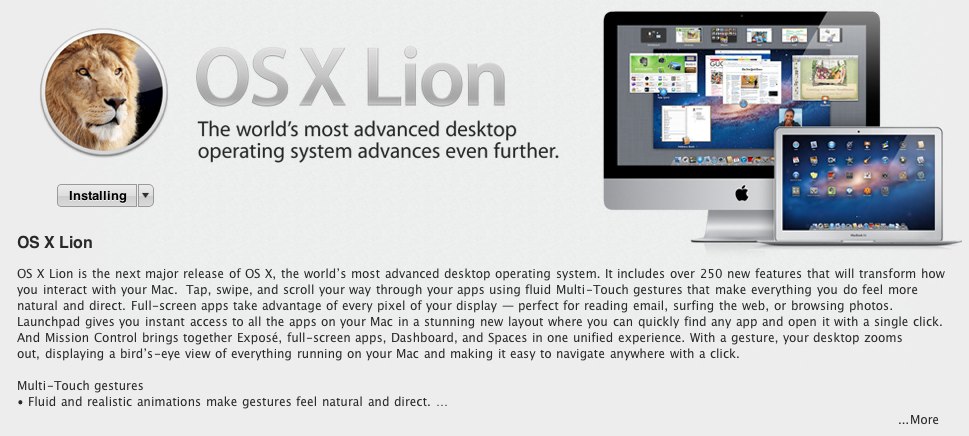
I only just began my download so I am making myself my own guinea pig. I feel I should say that if you do decide to upgrade your operating system to Lion today, do a full backup of your system. Only install the new OS if you are certain all of your apps are compatible. To do this, check out Roaring App’s table of Lion compatibility.
Also, it is always best to wait at least a few weeks before joining in on a major operating system upgrade, especially if you are doing so on your workhorse machine. Let’s see what the bugs are, if your printer is supported, if it corrupts harddrives, etc. That being said, here goes!
For those who don’t know, this is the culmination of Apple engineers tweaking and adding to the features of Snow Leopard, their previous operating system, while borrowing generously from their own touch-based operating system.
In this version of their desktop operating system, Apple extends the gestures first seen in Leopard to unify the desktop to a touch interface, without relying on a capacitive monitor. Hewlett-Packard and Dell have both sold touch-based desktop systems for years. From HP it is their TouchSmart line of computers while Dell has the Inspiron One with its optional touch screen.
The problem with both of these systems is apparent after a short while using them. Sitting at a traditional desk and reaching up and out constantly to navigate your screen isn’t only fatiguing, it isn’t intuitive. Tapping the tiny dialog options or changing the size of a window is a certified pain in the ass.
Apple, on the other hand, released two years ago the Magic Track Pad, along with the Magic Mouse. Both of these input devices use a table-top touch interface. Their names make the pretty self-explanatory but it is worth nothing that the track pad is pretty gigantic.
What else besides gestures does Lion bring? I won’t bore you with the details, as there are over 250 changes but here are a few highlights.
- Major upgrades in accessibility for those who need it (check the list out here).
- Totally revamped core applications like Mail, Address Book, iCal etc.
- Automatically saves versions of documents as you edit them, Time Machine per app.
- Automatically resumes where you left off after a restart or simply an apps last state.
- Full screen apps, again taking note from their iOS.
- Social integration takes your social contacts and sends them to Address book.
- Digital delivery means you no long have to keep track of the install DVD.
- Easily restore to a fresh install of Lion with its new partition-based install support.
- More powerful search throughout the operating system.
- New Dashboard and Expose combo called Mission Control, again an iOS touch.


@justex07 OSXLion is amazeballs!
@justex07 OSXLion is amazeballs!
@chris6969 awesome! Apparently only three minutes left in my Lion installation 🙂
@chris6969 awesome! Apparently only three minutes left in my Lion installation 🙂
@justex07 get your fingers ready!
@justex07 get your fingers ready!
@chris6969 I’m a little weary about gestures. They made using Photoshop hell back when Leopard came out. Hopefully it’s improved since then.
@chris6969 I’m a little weary about gestures. They made using Photoshop hell back when Leopard came out. Hopefully it’s improved since then.
@justex07 not that much…
@justex07 not that much…
@chris6969 not that much improved? Uh oh. Well that’s ok, I use Logitech Performance MX mice to navigate my computers.
@chris6969 not that much improved? Uh oh. Well that’s ok, I use Logitech Performance MX mice to navigate my computers.
@justex07 Been tweeting about this morning. Overall fantastic… with some caveats.
@justex07 lucky you. I need a Bamboo tablet.
@justex07 Been tweeting about this morning. Overall fantastic… with some caveats.
@justex07 lucky you. I need a Bamboo tablet.
@justex07 My work probably has a crappy DSL network. :p
@justex07 My work probably has a crappy DSL network. :p
@Blogography look forward to reading your overview on your blog as you’ve done in the past (awesome cartoons and all). Such great insight.
@Blogography look forward to reading your overview on your blog as you’ve done in the past (awesome cartoons and all). Such great insight.
@chris6969 I have one of those too, don’t really use it since I realized I have no real drawing skills.
@chris6969 I have one of those too, don’t really use it since I realized I have no real drawing skills.
@heyclement well mine JUST finished and I’m logging in for the first time. You are welcome to live through me 🙂
@heyclement well mine JUST finished and I’m logging in for the first time. You are welcome to live through me 🙂
@justex07 hahahahaha!
@justex07 hahahahaha!
@justex07 Please LIVE-tweet it! 😀
@justex07 Please LIVE-tweet it! 😀
@justex07 I dunno. This release is so love/hate. So many amazing things to love tempered with inexplicable crap I hate. 🙁
@justex07 I dunno. This release is so love/hate. So many amazing things to love tempered with inexplicable crap I hate. 🙁
@heyclement haha, we’ll see. Definitely updating the blog with my thoughts later.
@heyclement haha, we’ll see. Definitely updating the blog with my thoughts later.
@Blogography sounds like Snow Leopard all over again.
@Blogography sounds like Snow Leopard all over again.
@justex07 if you have two Macs, you should totally do one of those @engadget style live-blogging of your first hand-on with Lion. 😀
@justex07 if you have two Macs, you should totally do one of those @engadget style live-blogging of your first hand-on with Lion. 😀
@heyclement I do but my other computer is my beautiful iMac that has been incompacitated ever since the mold at our apartment.
@heyclement I do but my other computer is my beautiful iMac that has been incompacitated ever since the mold at our apartment.
@justex07 :/ Make it an opportunity. Time to upgrade to the Thunderbolt iMac? ;P
@justex07 :/ Make it an opportunity. Time to upgrade to the Thunderbolt iMac? ;P
@heyclement not just yet. Being without an apartment for four months and traveling for work is expensive enough as it is. :-
@heyclement not just yet. Being without an apartment for four months and traveling for work is expensive enough as it is. :-
@justex07 what’s your impression with lion?
@justex07 what’s your impression with lion?
@ropiko so far so good. It is still indexing, migrating and updating various applications and files so I can’t review its performance yet.
@ropiko so far so good. It is still indexing, migrating and updating various applications and files so I can’t review its performance yet.
@justex07 ah:), i’ve had some problems with the way apple took out features etc. some really small but still handy 🙂
@justex07 ah:), i’ve had some problems with the way apple took out features etc. some really small but still handy 🙂
@ropiko Hmm, what features are you referring to? I’d love to know more about what you’ve noticed missing in Lion.
@ropiko Hmm, what features are you referring to? I’d love to know more about what you’ve noticed missing in Lion.
@justex07 Keyboard commands, with volume up or down, without the blip sound or a quarter up & down are gone, So is spaces, and front row.
@justex07 Keyboard commands, with volume up or down, without the blip sound or a quarter up & down are gone, So is spaces, and front row.
@ropiko keyboard cmds are missing? Blips during volume change can be toggled. Spaces/Front Row were cool but I personally never used them.
@ropiko keyboard cmds are missing? Blips during volume change can be toggled. Spaces/Front Row were cool but I personally never used them.
@ropiko but I can see how if you are used to something, and then it is gone, especially Front Row or Space, things can get annoying.
@ropiko but I can see how if you are used to something, and then it is gone, especially Front Row or Space, things can get annoying.
@justex07 my iMac boots 5 sec slower, click & holding an icon would activate exposé, now it acts like a right mouse button.
@justex07 my iMac boots 5 sec slower, click & holding an icon would activate exposé, now it acts like a right mouse button.
@ropiko I imagine Front Row will be folded into iTunes in full screen mode once the final beta is out.
@ropiko I imagine Front Row will be folded into iTunes in full screen mode once the final beta is out.
@ropiko did you do a fresh format and install or an update? Usually it’s the format and install that provides the big jump in performance.
@ropiko did you do a fresh format and install or an update? Usually it’s the format and install that provides the big jump in performance.
@justex07 i don’t use spaces at home b/c i have multiple displays but i do use them at my work.
@justex07 i don’t use spaces at home b/c i have multiple displays but i do use them at my work.
@ropiko yeah, Spaces was really clunky on my dual screen setups which is also why I didn’t use it haha.
@ropiko yeah, Spaces was really clunky on my dual screen setups which is also why I didn’t use it haha.
@justex07 did an upgrade of lion 🙂 after that i did some cleaning with OnyX and repaired some persmissions etc. no improvement.
@justex07 did an upgrade of lion 🙂 after that i did some cleaning with OnyX and repaired some persmissions etc. no improvement.
@ropiko I will be doing a format and install on my iMac, once I have my office back and can set it up again. Will report on the change 😀
@ropiko I will be doing a format and install on my iMac, once I have my office back and can set it up again. Will report on the change 😀
@justex07 i did have a few apps that were discontinued by their developers and worked under snow, but crashes onder lion 🙁
@justex07 i did have a few apps that were discontinued by their developers and worked under snow, but crashes onder lion 🙁
@ropiko Any news on running a windowed installation of Snow Leopard within Lion via Bootcamp? That was possible in the beta…
@ropiko Any news on running a windowed installation of Snow Leopard within Lion via Bootcamp? That was possible in the beta…
@justex07 ok! 🙂 maybe when i buy myself a new 2011 iMac ill do a clean drag & drop of files and folders 🙂
@justex07 ok! 🙂 maybe when i buy myself a new 2011 iMac ill do a clean drag & drop of files and folders 🙂
@ropiko Apple would love that. LoL
@ropiko Apple would love that. LoL
@justex07 haven’t tried that one yet, i would like it if they could do the same as parallels, make an image where you can boot from
@justex07 haven’t tried that one yet, i would like it if they could do the same as parallels, make an image where you can boot from
@justex07 dont really want to add another partition to my HD.
@justex07 dont really want to add another partition to my HD.
@justex07 chiddy55 Are you retarded?:S http://t.co/iIJTpZw
@justex07 what is your lion build number?
@justex07 what is your lion build number?
@ropiko build 11A511
@ropiko build 11A511
@justex07 I just bought it. I can’t wait to get it installed.
@justex07 I just bought it. I can’t wait to get it installed.